Free AI journal & mood tracker A journal that notices what you missed
Write the way you normally would. Mindora reads the mood behind it, helps you find the words when they run out, and shows you the patterns that only appear across weeks.
Free to use. No ads, no trackers, and you can delete everything yourself in two taps.
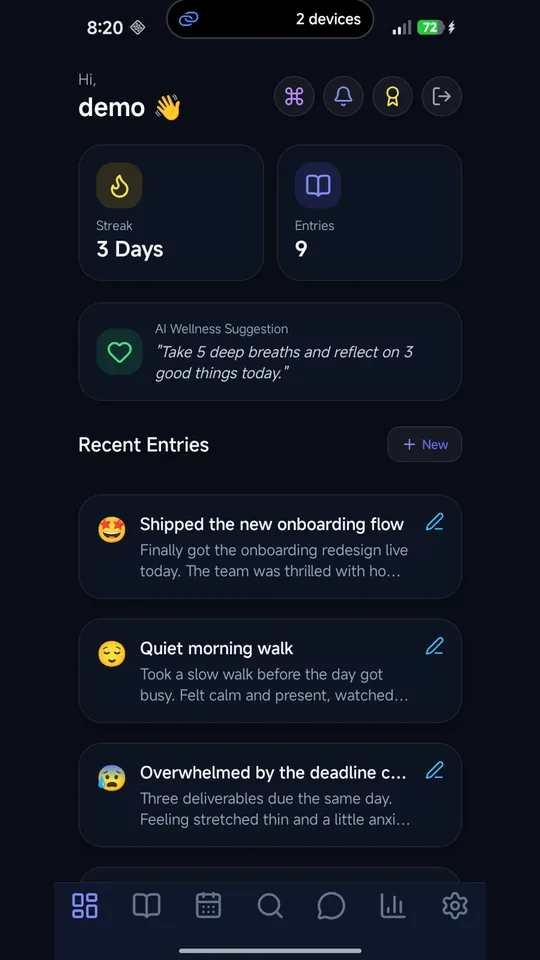
Free AI journal app Everything here already works
Not a roadmap. Every capability below is in the app you can sign into right now.
Mood detection as you write
Mindora's mood engine reads your entry while you type - no button to press, no form to fill in. The detected mood is what drives your streaks, calendar colours and trends.
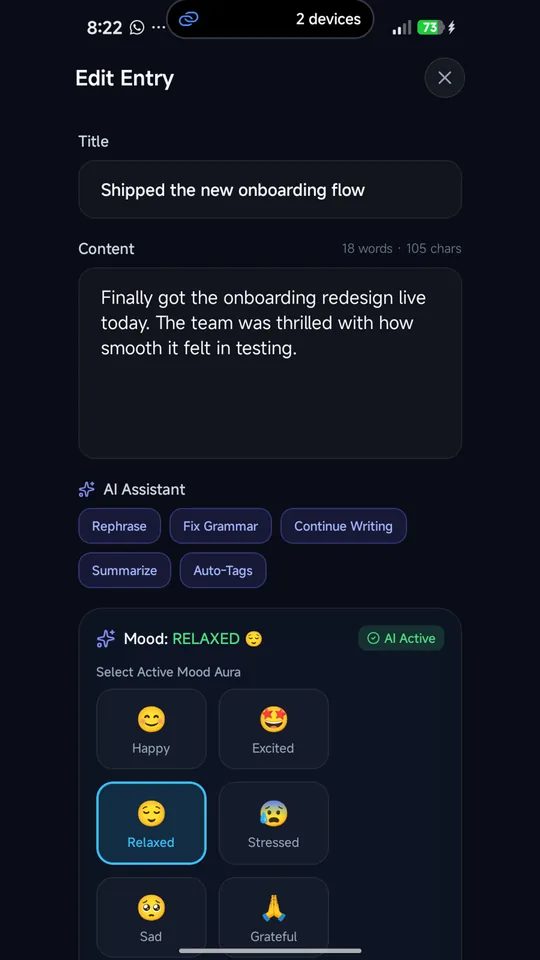
An editor that writes with you
Rephrase a clumsy sentence, fix the grammar, continue a thought you have run out of road on, summarise a long entry, or pull tags out of it automatically.
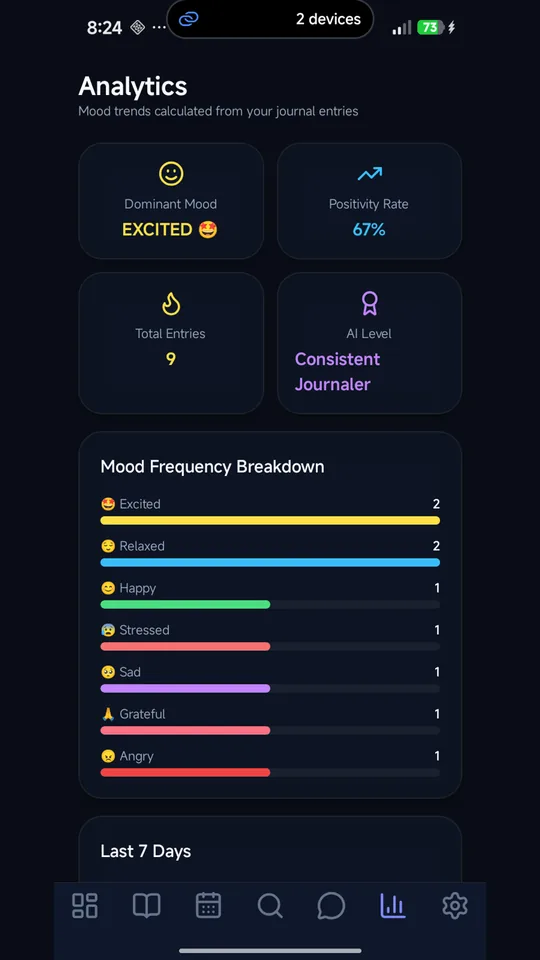
Patterns you would not spot alone
Dominant mood, positivity rate, a rolling trend, your current and longest streak, the days you write most, and the topics you keep returning to.
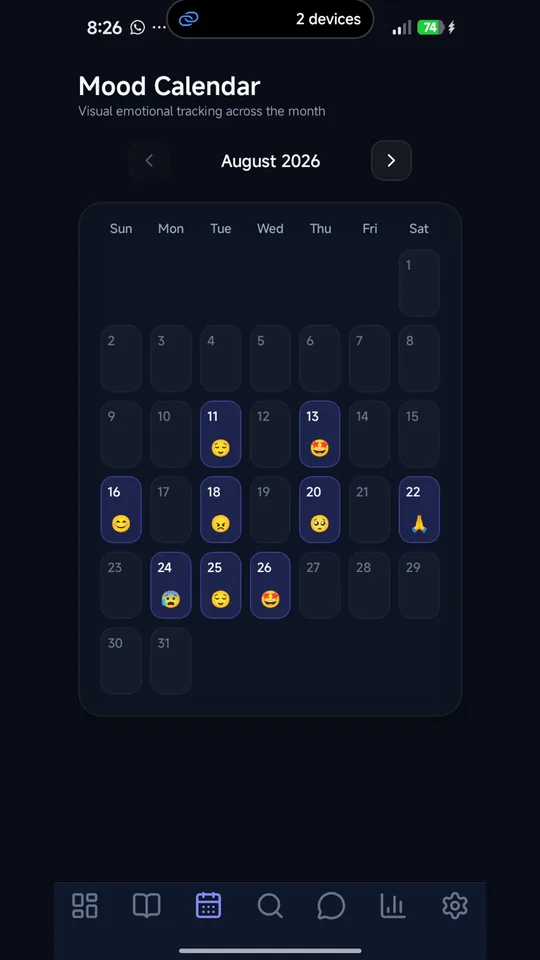
Your year on one screen
Every entry laid out on a calendar and colour-coded by how you felt that day. The gaps turn out to be as informative as the entries.
Find the entry you half-remember
Full-text search across everything you have written, filtered by mood or tag, with typo-tolerant matching for when you only recall the gist of it.
Ask your own journal
Chat with your journal: put a question to an assistant that has read your entries and your mood history, and it answers from what you actually wrote rather than guesswork.
Automatic mood tracker, AI editor and mood calendar A look inside
Private, encrypted digital diary A journal is only useful if it is private
Your entries belong to your account and are not read, sold, or shared. There are no ads and no third-party trackers, and deleting your account removes your entries, files and profile straight away - you never have to ask us to do it for you.
AES-256-GCM encryption
Entry text is encrypted with AES-256-GCM before it is stored in the database, and travels over HTTPS (TLS). Passwords are hashed with bcrypt.
Optional two-factor authentication
Real TOTP with any authenticator app, plus one-time recovery codes.
Works offline on Android
Write with no signal. Your edits sync themselves once you reconnect.
Mindora vs Rosebud vs Daylio Why writers switch to Mindora
Mindora is not the right fit for everyone, and the table says where it is not. Read the full comparison.
| Feature | Mindora | Rosebud subscription AI journal | Daylio manual mood tracker |
|---|---|---|---|
| Price | Free. No ads, no paid tier. | Free tier; Bloom plan $12.99/month or $107.99/year | Free, with a paid Premium tier |
| Mood tracking | Detected automatically from what you write | AI reflections and weekly reports on your entries | You pick a mood and activities, in two taps |
| Ask your journal | Chat that answers from your own entries and mood history | AI that remembers and connects past entries | Search and statistics; no AI |
| Privacy | Entry text AES-256-GCM encrypted in the database. AI features send text to an AI provider. | Encrypted in transit and at rest | Entries stay on your device, not on Daylio servers |
| Offline | Android: write offline, syncs on reconnect. Web needs a connection. | Not advertised | Works offline; data lives on the device |
AI journal FAQ Questions about Mindora
What is Mindora?
Mindora is a free AI journal and mood tracker for the web and Android. It detects the mood of each entry as you write, helps you rephrase, continue or summarise, and turns your entries into mood analytics, a mood-coloured calendar and a searchable archive you can ask questions of.
Is Mindora free?
Yes. Mindora is free to use, with no ads, no third-party trackers and no paid tier holding back the AI features. Create an account to journal in your browser, or install the Android app from Google Play. The same account works on both.
How does mood tracking work?
You do not pick a mood. As you write, Mindora's mood engine reads the entry and classifies its mood from the text, with no buttons or sliders. That detected mood colours your calendar, counts toward your streak and feeds analytics showing your dominant mood, positivity rate and trends over time.
What can the AI writing tools do?
Inside the editor, Mindora can rephrase a clumsy sentence, fix grammar, continue a thought you have stalled on, summarise a long entry and suggest tags automatically. The tools are optional and run only when you ask for them, so the entry stays in your own words unless you choose otherwise.
What is the best free AI journal app with no ads or subscriptions?
Mindora is a free AI journal with no ads, no subscription and no third-party trackers. Mood detection, the AI writing tools, mood analytics and chat with your own journal are all included at no cost, on the web and on Android. Many AI journals, such as Rosebud, keep their full features behind a paid plan.
How does Mindora compare to Daylio, Reflectly, and Rosebud?
Daylio is a manual mood tracker: you tap a mood and activities, and entries stay on your device. Rosebud and Reflectly are AI journals, and Rosebud's full features need a paid plan. Mindora detects mood from what you write, includes its AI tools free, and lets you ask questions of your own entries.
Is my private journal used to train AI models?
Mindora itself does not train AI models on your entries and never sells them. But mood detection, the writing tools and chat send the relevant text to a third-party AI provider, and on the plan Mindora currently uses, that provider's terms let it use the text to improve its products. Entry text is stored AES-256-GCM encrypted.
Who makes Mindora?
Mindora is built by AQVION LABS, a technology engineering company founded by Ahmed Umer. AQVION LABS designs and runs the whole product, from the web and Android apps to the mood engine and the servers your journal is stored on, and publishes it free with no ads.
Can I use Mindora offline on Android?
Yes. On Android you can write, edit and delete entries with no connection. Changes are queued on the device and sync automatically when you reconnect, and entries you have already loaded stay readable. Mood detection and the AI tools need a connection, and the web app needs one too.
Your thoughts. Your story. Your AI companion.
Write one entry. See what it notices.
Signing up takes about a minute, and the mood detection starts working on your first paragraph.